![[admin post]](http://www.dreamwidth.org/img/silk/entry/admin_post.png)
![[sticky entry]](http://www.dreamwidth.org/img/silk/entry/sticky_entry.png)
![[community profile]](https://www.dreamwidth.org/img/silk/identity/community.png) style_system. If your post here does not feature a layout/theme, it will be deleted. You can read the complete community guidelines here. Thanks!
style_system. If your post here does not feature a layout/theme, it will be deleted. You can read the complete community guidelines here. Thanks!![[admin post]](//www.dreamwidth.org/img/silk/entry/admin_post.png)
![[sticky entry]](//www.dreamwidth.org/img/silk/entry/sticky_entry.png) Admin Post: Sticky: Important Note
Admin Post: Sticky: Important Note
Apr. 27th, 2017 04:02 pm![[personal profile]](https://www.dreamwidth.org/img/silk/identity/user.png) alchemy
alchemyThis community is for sharing Dreamwidth themes only. If you have questions about a layout or need help with your code, contact the maker or try style_system. If your post here does not feature a layout/theme, it will be deleted. You can read the complete community guidelines here. Thanks!
style_system. If your post here does not feature a layout/theme, it will be deleted. You can read the complete community guidelines here. Thanks!SPLASH SERIES: MOON
Aug. 30th, 2026 10:58 pmgelateria
Moon Series
Click here for the seven splash pages
Seven splash pages for a Tabula Rasa journal. The moon sits on the page; hover a destination to change its phase. Each listing has the CSS, the entry HTML, and a live preview. Please credit gelateria if used!
SPLASH PAGES: PEARL
Aug. 20th, 2026 09:38 pmgelateria
Pearl Series
Click here for the twenty-eight splash pages
Twenty-eight splash pages for a Tabula Rasa journal: nacre, mother-of-pearl, pale color and a pearl on the page. Each listing has the CSS, the entry HTML, and a live preview. Please credit gelateria if used!
Editorial Minimalism Tabula Rasa Layouts
Aug. 2nd, 2026 11:00 pmgelateria
Editorial Minimalism
Click here for Bread and Roses (25 layouts) and here for Core Editorial Minimalism (18 layouts)
Forty-three Tabula Rasa Custom CSS themes for Dreamwidth, split across two collections. Bread and Roses is the warm half: cream paper, wheat gold, dusty rose, layouts named after work and shared life. Core is the editorial half: print-shop structure, mastheads, folios, ledger grids. Each post has screenshots, hosted stylesheets, and a preview hub with twelve Dreamwidth views. Pick a layout, copy the CSS into Custom CSS, and go. Please credit gelateria if used!
THE COMMONPLACE LAYOUT GENERATOR
Jul. 29th, 2026 01:15 amgelateria
THE COMMONPLACE GENERATOR
Click here for links to the generator
The Commonplace is a layout generator for Dreamwidth's Tabula Rasa style, built for that left-column, stacks-on-mobile sidebar shape the early 2010s Tumblr journals all had. It runs in the browser outside Dreamwidth, so open the main link (or a mirror if the primary is slow), pick one of 28 recipes, adjust colours, fonts, spacing, icons, and sidebar styling against the live preview, then copy the Dreamwidth settings and the generated CSS into your journal. Please let me know if anything is wrong with it!
Additionally, I've updated my permissions generator, my profile generator and my muselist generator with bug fixes. Thank you to all of those who commented!
Perfectly Balanced
Jul. 5th, 2026 03:25 pmbreadTitle: Perfectly Balanced
Credit to:vuvuzela
Base style: Practicality
Type: CSS
Best resolution: Built in 1912x1074 – Mobile responsive
Tested in: Built in Firefox. Tested in Chrome & Opera on Windows OS. Tested in Android OS with Firefox.
Features: Mobile Responsive! Intended for "navigation panel" splash page style layouts.. Perfectly centers journal content vertically. Uses base dreamwidth CSS to prevent "navigation panel" codes from shifting.
Credit to:
vuvuzelaBase style: Practicality
Type: CSS
Best resolution: Built in 1912x1074 – Mobile responsive
Tested in: Built in Firefox. Tested in Chrome & Opera on Windows OS. Tested in Android OS with Firefox.
Features: Mobile Responsive! Intended for "navigation panel" splash page style layouts.. Perfectly centers journal content vertically. Uses base dreamwidth CSS to prevent "navigation panel" codes from shifting.
( Layout Instructions, Live Preview, & CSS ) | |
What are the best mobile-friendly styles?
Jun. 1st, 2026 12:56 pmnumb3r_5ev3nI did check the tags before posting this, but I didn't see anything. There are a lot of styles that look great on a computer, but condense the text/entry area to a narrow vertical column when read on a mobile device. Mobility seems to be the best one for mobile (obviously) but I kind of hate the way it looks on a computer. Does anyone know a decent theme which allows for some customization (like custom backgrounds) but looks decent and reads decently on a mobile device? Or is there something I can throw into the custom CSS section of the customize theme page to fix this? I'd love to use the 5 AM theme, but it kind of looks like crap on my phone. Thanks in advance.
EDIT: I have switched back to Practicality. Thanks for your feedback, everyone.
EDIT: I have switched back to Practicality. Thanks for your feedback, everyone.
nadine v.2 for tabula rasa
May. 3rd, 2026 03:12 ammanualTitle: Nadine v.2
Credit to:pagans
Base style: Tabula Rasa
Type: CSS
Best resolution: 1024x768 and higher
Tested in: firefox, chrome
Features: minimalist, single column, DIY background if desired
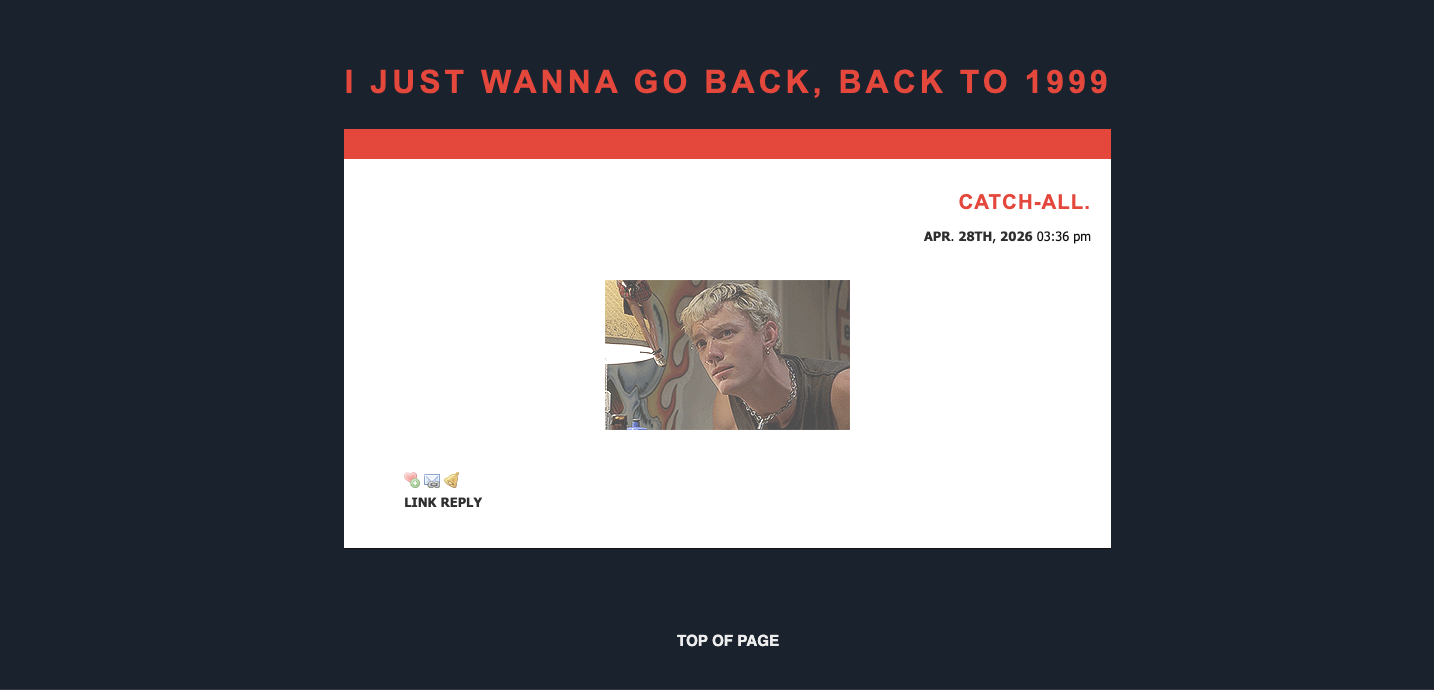
( installation )
Credit to:
pagansBase style: Tabula Rasa
Type: CSS
Best resolution: 1024x768 and higher
Tested in: firefox, chrome
Features: minimalist, single column, DIY background if desired
( installation )
Modern Narrow Light/Dark for Tabula Rasa
Mar. 31st, 2026 03:05 pmemcapi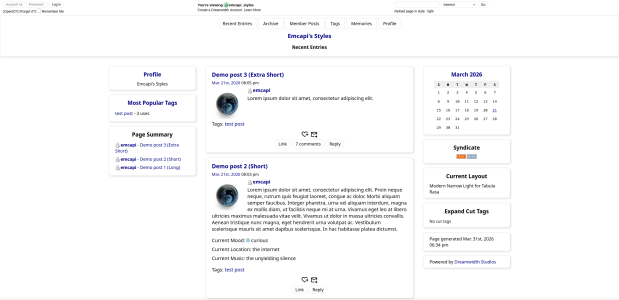
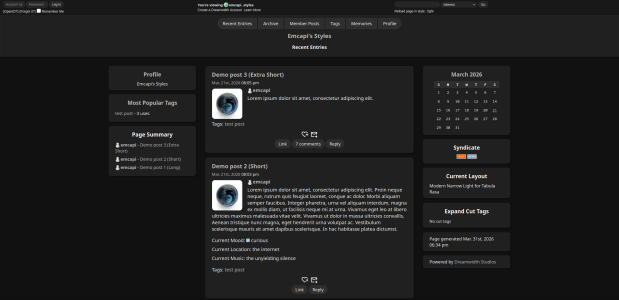
CSS code, instructions, larger previews, permissions, etc. on Github.
Title: Modern Narrow Light & Modern Narrow DarkCredit to:
emcapi / emcapi_styles (journals have live previews of dark/light, respectively!)Base style: Plain for Tabula Rasa
Type: CSS
Best resolution: Any, mobile responsive
Tested in: Firefox, Firefox for Android
Features:
- Minimalist, modern design
- Full mobile support
- Navbar styling
- Highly customizable; supports all modules and standard column layouts, including custom sidebar widths (within reason)
- Optional header nav links support
- Narrow, fixed-width center column on desktop and default sans-serif font for improved readability
- Entry/comment page support, with visual comment thread indicators
- Support for other pages including archive, reading page, tags page, and "more options" comment reply
- Custom comment/entry/user interaction icon buttons with colors on hover
- Designated color code section in CSS for easy editing
- ...and more!
Copic Marker Layout for Practicality
Feb. 11th, 2026 01:27 pmbreadTitle: Copic Marker Layout
Credit to:vuvuzela
Base style: Practicality
Type: CSS
Best resolution: Built in 1912x1074 – Mobile responsive
Tested in: Built in Firefox. Tested in Chrome & Opera on Windows OS. Tested in Android OS with Firefox.
Features: Mobile Responsive! Stylized home page, reading page, entry/comments page, icons page, and "more options" reply page.
( Layout Instructions, Live Preview, & CSS )
Credit to:
vuvuzelaBase style: Practicality
Type: CSS
Best resolution: Built in 1912x1074 – Mobile responsive
Tested in: Built in Firefox. Tested in Chrome & Opera on Windows OS. Tested in Android OS with Firefox.
Features: Mobile Responsive! Stylized home page, reading page, entry/comments page, icons page, and "more options" reply page.
 | |
 |  |
( Layout Instructions, Live Preview, & CSS )
"I Already Decided" for Bases
Jun. 30th, 2025 03:45 pmceuTitle: (I'm supposed to win!) I already decided!
Credit to:ceu
Base style: Bases (Tropical)
Type: CSS
Best resolution: 1200x800 | Desktop only
Tested in: Google Chrome, Safari, Firefox
Features: Two column, fixed width, supports only custom text & navigation, custom background

live preview/usage @blackthorncity
(fake cut for instructions and code)
Credit to:
ceuBase style: Bases (Tropical)
Type: CSS
Best resolution: 1200x800 | Desktop only
Tested in: Google Chrome, Safari, Firefox
Features: Two column, fixed width, supports only custom text & navigation, custom background
live preview/usage @
blackthorncity(fake cut for instructions and code)
106. Florence for DW's Transmogrified
Apr. 29th, 2025 02:27 pmsireesanwar
Title: Florence
Credit to:
layoutlounge Base style: Transmogrified > Basic
Type: CSS
Best resolution: 1600 x 900 + (works with 1280 x ?)
Tested in: Firefox & Edge
Features: Entry userpic, semi-responsive, Gray and white contrast with pink, custom sidebar
sireesanwar
Title: I'll Be There
layoutlounge Base style: Transmogrified > Basic
Type: CSS
Best resolution: 1600 x 900 + (works with 1280 x ?)
Tested in: Firefox & Edge
Features: semi-responsive, Gray and white contrast, sidebar
[Tabula Rasa] No Style Please
Apr. 19th, 2025 02:41 pmspeperteristico
Code here
speperteristicoTitle: No-Style-Please
Base style: Tabula Rasa
Type: CSS
Tested in: Firefox, Firefox mobile
Features: Minimalistic, mobile friendly, automatic light/dark palette switch to match the browser's preferred color scheme
sireesanwar
Title: Revolumna Inspiree
Credit to:
layoutlounge Base style: Transmogrified > Basic
Type: CSS
Best resolution: 1600 x 900 + (works with 1280 x ?)
Tested in: Firefox & Edge
Features: Default userpic image, semi-responsive, Gray and white contrast
124. Gradient Sense Dark
Apr. 7th, 2025 10:58 amsireesanwar
LJ Expressive: [ PREVIEW IMAGE ]
LJ Flex Sqres: [ PREVIEW IMAGE ]
DWs Bannering: [ PREVIEW IMAGE ]
FIND LAYOUT HERE @
layoutlounge Title: Gradient Sense Dark
Credit to: layoutlounge
Base style: Bannering > Adjustable Strips
Type: CSS
Best resolution: 1600 x 900 + (works with 1280 x ?)
Tested in: Firefox & Edge
Features: Gradient background, semi-responsive, dark and contrast
123. Gradient Sense Reversed
Apr. 2nd, 2025 11:53 amsireesanwar
Expressive: [ PREVIEW IMAGE ] Flex Sqres: [ PREVIEW IMAGE ] DWs Bannering: [ PREVIEW IMAGE ]
You can find the coding links at THIS POST @
layoutloungeTitle: Gradient Sense Reversed
Credit to:
layoutlounge Base style: Bannering > Adjustable Strips
Type: CSS
Best resolution: 1600 x 900 + (works with 1280 x ?)
Tested in: Firefox & Edge
Features: Gradient background, semi-responsive

tabula rasa: ditto
May. 30th, 2023 08:46 amluckyzukky
Credit to:
shinemagic or luckyzukky Base style: Tabula Rasa
Type: CSS
Best resolution: 1920x1080
Tested in: firefox
Features: simple, 1 column, header
here @
shinemagic 
old lj layout "Tabular Indent"
Dec. 16th, 2022 09:52 pmshellzI wanted to install some of the other older LiveJournal styles. This one is Tabular Indent!
 download the Tabular Indent raw code here
 Go to Advanced Customization.
Click on Your Layers
Under "Create top-level layer", select "Layout" for Type and "Core 1" for Core Version. Hit create.
You'll be taken back to your layers page. You should see a layer titled "Livejournal S2 Core V1". Click edit. Paste the code and click save & compile.
If you want to fix your reading page to show the usernames, follow the tutorial listed on this page.
Now you need to use the layout. Go to Customize Journal Style page. Click on "Your Custom Layers" and apply your new theme
To edit the theme colors and fonts further, click "Customize".
( Preview of the Tabular Indent layout )
download the Tabular Indent raw code here Go to Advanced Customization. Click on Your Layers Under "Create top-level layer", select "Layout" for Type and "Core 1" for Core Version. Hit create. You'll be taken back to your layers page. You should see a layer titled "Livejournal S2 Core V1". Click edit. Paste the code and click save & compile. If you want to fix your reading page to show the usernames, follow the tutorial listed on this page.Now you need to use the layout. Go to Customize Journal Style page. Click on "Your Custom Layers" and apply your new theme To edit the theme colors and fonts further, click "Customize".old lj layout "Disjointed"
Dec. 16th, 2022 09:51 pmshellzI wanted to install some of the other older LiveJournal styles. This one is Disjointed. I rememeber it being a favorite of the alternative kids and the boys/men on the website, especially in those early days.
download the Disjointed raw code here
Go to Advanced Customization.
Click on Your Layers
Under "Create top-level layer", select "Layout" for Type and "Core 1" for Core Version. Hit create.
You'll be taken back to your layers page. You should see a layer titled "Livejournal S2 Core V1". Click edit. Paste the code and click save & compile.
If you want to fix your reading page to show the usernames, follow the tutorial listed on this page.
Now you need to use the layout. Go to Customize Journal Style page. Click on "Your Custom Layers" and apply your new theme
To edit the theme colors and fonts further, click "Customize".
( Preview of the Disjointed layout )
download the Disjointed raw code here Go to Advanced Customization. Click on Your Layers Under "Create top-level layer", select "Layout" for Type and "Core 1" for Core Version. Hit create. You'll be taken back to your layers page. You should see a layer titled "Livejournal S2 Core V1". Click edit. Paste the code and click save & compile. If you want to fix your reading page to show the usernames, follow the tutorial listed on this page.Now you need to use the layout. Go to Customize Journal Style page. Click on "Your Custom Layers" and apply your new theme To edit the theme colors and fonts further, click "Customize".

