
itsanooray (![[personal profile]](https://www.dreamwidth.org/img/silk/identity/user.png) itsanooray) wrote in
itsanooray) wrote in ![[community profile]](https://www.dreamwidth.org/img/silk/identity/community.png) dreamwidthlayouts2012-03-04 06:52 pm
dreamwidthlayouts2012-03-04 06:52 pm
itsanooray) wrote in dreamwidthlayouts2012-03-04 06:52 pm


Joyride for Tabula Rasa
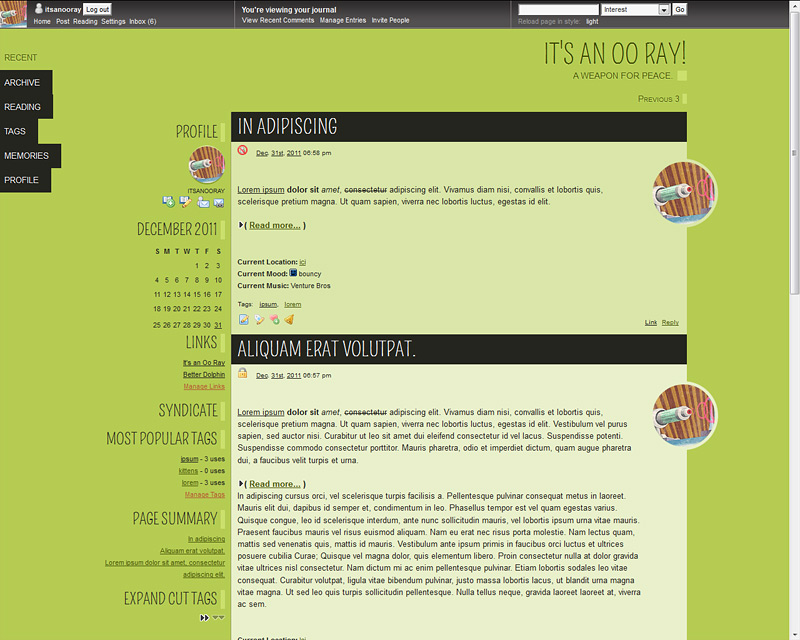
Title: Joyride Credit to: betterdolphinBase style: Tabula Rasa Type: CSS Best resolution: Made on 1280 x 1024, should work at a minimum of 1024 x 600 (netbook) Tested in: IE7-9, latest Firefox and Chrome (see post for notes on IE) Features: 6 different colors (though you're free to edit) and fixed side menu EDIT There was an issue with the profile userpic being distorted on phones/some browsers, I have fixed it, so please grab again if you want! Find it all here! |
no subject
no subject
no subject
no subject
no subject
My only problem is that my default user pic stretches on my screen (my computer has a widescreen). Is there any way to fix this that doesn't involve hiding the default user pic?
no subject
no subject
The work computer I'm using has a resolution of 1680 x 1050 and my personal computer has a res of 1920 x 1080.
I tried to take a screenshot, but it's not letting me.
no subject
no subject
no subject
no subject
no subject
So what you can do is find this in the CSS:
#secondary .userpic img {
border-top: 1px solid #EACEDC;
border-bottom: 2px solid #541D38;
-moz-border-radius: 30px;
-webkit-border-radius: 30px;
border-radius: 30px;
width: 30%;
height: 30%;
}
And change the percentages to whatever px size you want your icon to be, like the normal size is:
width: 100px;
height: 100px;
I was going for something small in the sidebar though, so maybe try
width: 50px;
height: 50px;
I hope that helps
no subject
I changed it to 75px and it's perfect on both my computer and my iPhone!
And really, this layout it gorgeous!
no subject
ETA: Oh, so I checked it out on my phone, Android, using Dolphin as a browser and it was doing the funny resizing on my userpic too. Did the fix you posted above and now it seems okay, but thought I'd let you know.
no subject
no subject
no subject
no subject
no subject
no subject